How to Set Up Instagram Comment to DM Automation Step-by-Step
A complete step-by-step guide to setting up Instagram comment to DM automation: connect your account, choose a post, add keywords, write the reply, and go live in under 10 minutes.

Maya Lindström
Creator Education Lead
April 15, 2025
3 min read
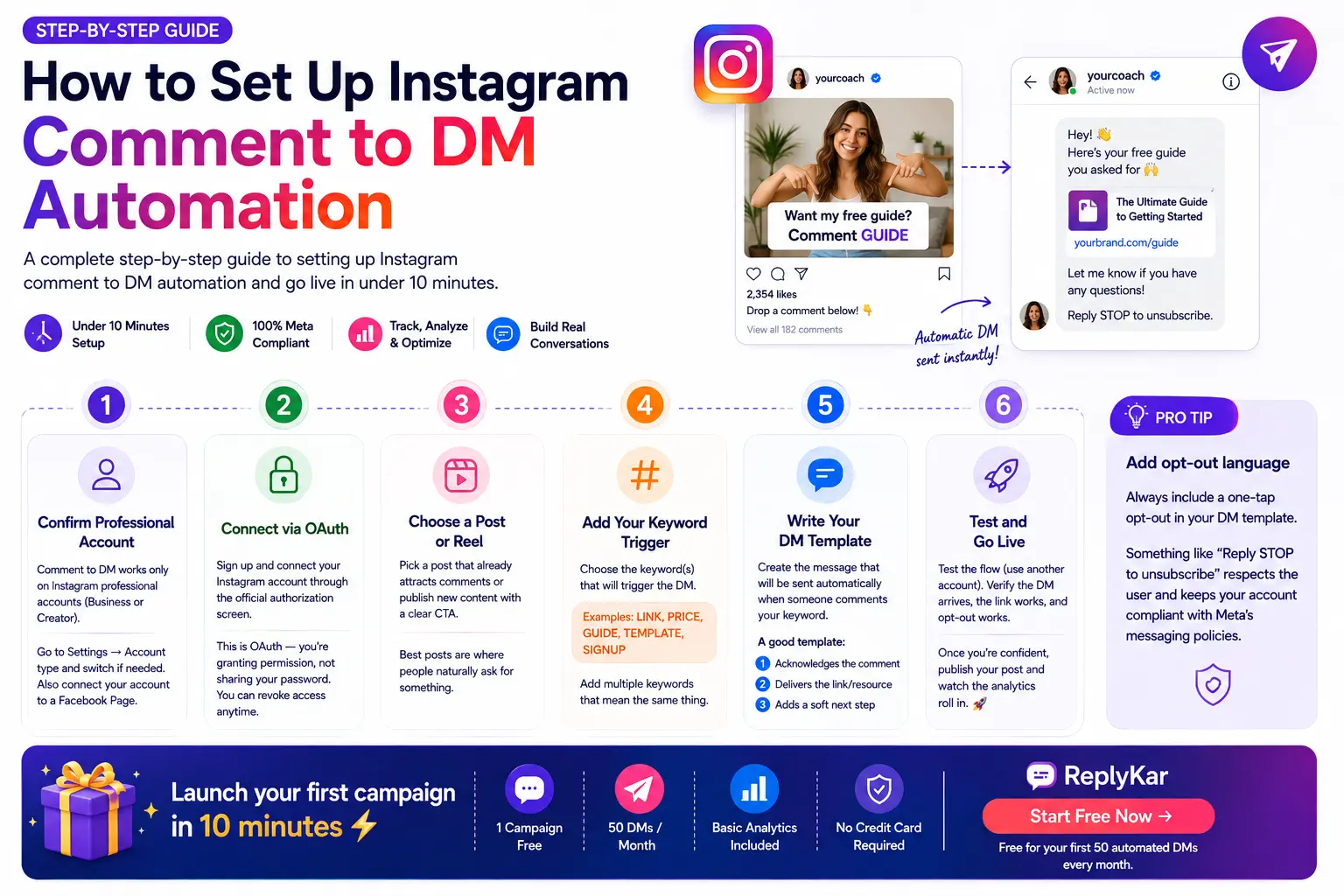
Setting up Instagram comment to DM automation sounds technical, but it's actually one of the simplest automations you can configure. Here's the complete walkthrough — from zero to your first automated DM in under 10 minutes.

Step 1: Confirm you have an Instagram professional account
Comment to DM automation only works on Instagram professional accounts (Business or Creator). Personal accounts cannot receive private replies through the Meta API. In the Instagram app, go to Settings → Account type and switch to Business or Creator if you have not already.
You also need your account connected to a Facebook Page through Meta Business settings — most platforms, including ReplyKar, walk you through this during login.
Step 2: Connect your account via OAuth
When you sign up for a comment-to-DM tool, you'll be redirected to Instagram's official authorization screen. This is OAuth — you're granting permission, not sharing your password. You can revoke this access at any time from your Instagram settings.
Step 3: Choose a post or reel
Pick a post that already attracts comments, or publish a new one with a clear call to action. The best posts for DM automation are ones where people naturally ask for something: "link please", "what's the price?", "how do I get this?"
Step 4: Add your keyword trigger
Enter the keyword(s) you want to trigger the DM. Common choices: LINK, PRICE, GUIDE, TEMPLATE, SIGNUP. You can add multiple keywords per campaign — for example, LINK, DETAILS, and INFO can all trigger the same DM.
Step 5: Write your DM template
This is the message that gets sent automatically when someone comments your keyword. Keep it short, personal, and include the link or deliverable you promised. A good template:
- 1Acknowledges the comment: "Hey! Here's that guide you asked for 🙌"
- 2Delivers the link or resource
- 3Adds a soft next step: "Let me know if you have any questions!"
Step 6: Test and go live
Before going live, test the flow yourself (or with a team member). Comment the keyword from a different account, verify the DM arrives, check the link works, and confirm the opt-out works. Once you're confident, publish your post and watch the analytics.